
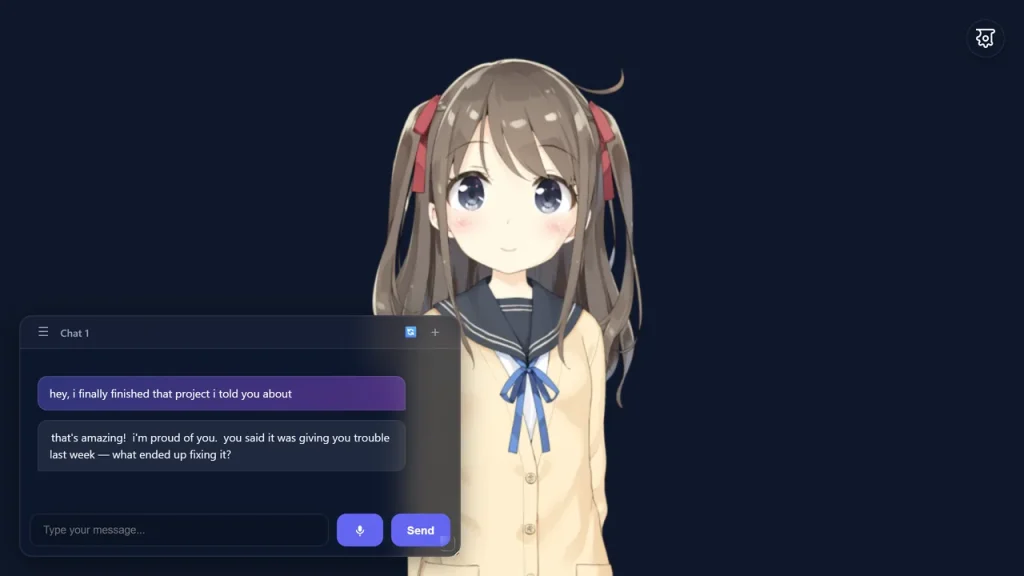
About WaifuAI
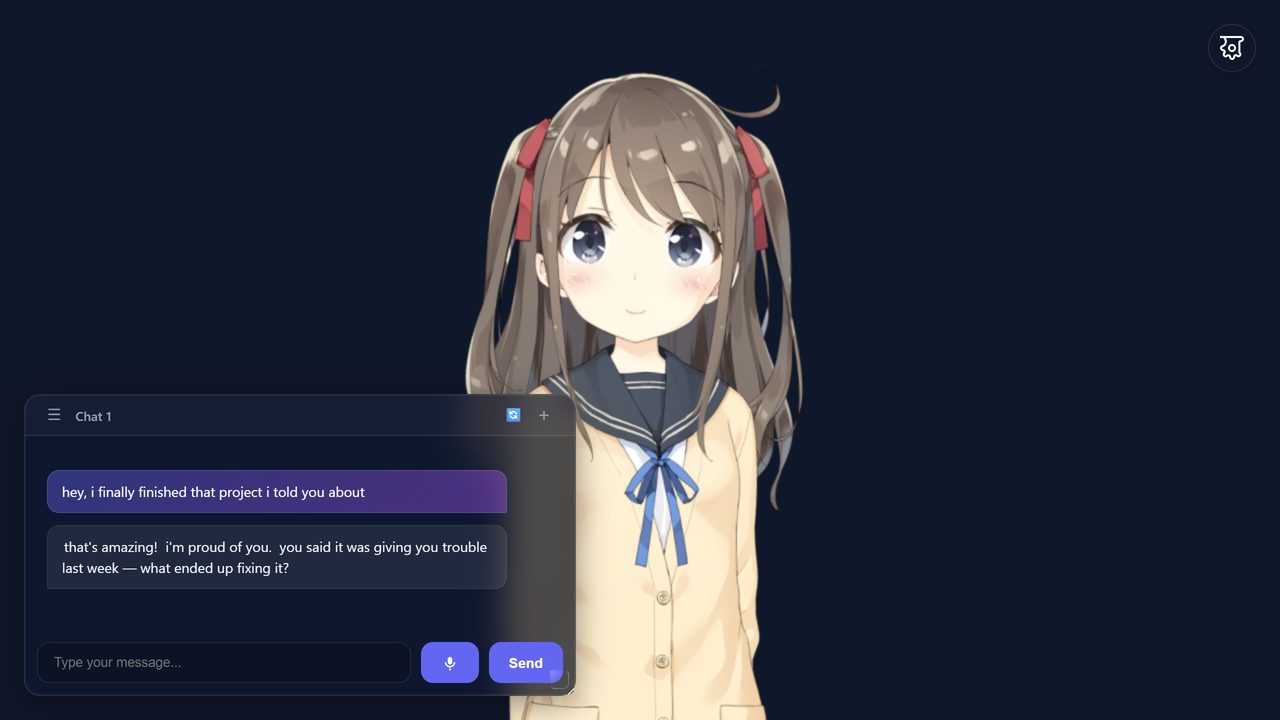
WaifuAI combines character chat, Live2D expressions, voice and conversation memory. Its hosted app includes a free model and voices without an account. You can change the persona or connect your own model provider.
Main features
- Chat with an animated Live2D character.
- Choose the persona, character and background.
- Hear replies through voices including local Kokoro TTS.
- Use microphone input supported by the browser.
- Keep configurable conversation memory and summaries.
- Connect OpenRouter or another supported model endpoint.
Inputs, outputs and access
See the product in use
Platforms and access
Browser app, including mobile browsers; self-hosted use runs from a local/static web server with WebGL support.
Pricing and plans
The hosted app includes a free model and voices without an account, subscription, paywall or expiring trial. Using your own OpenRouter, Groq or another model endpoint follows that provider’s charges and limits. Self-hosting can involve hosting and model costs.
Open source and deployment
The waifu-companion repository code is MIT-0 licensed. Live2D/Cubism, character assets, voice engines and connected model weights have their own applicable licenses.
Data and privacy
Conversations, settings and memory are stored in the browser. WaifuAI Cloud is the default model provider and receives conversation context for inference; optional providers also receive conversation context.
Frequently asked questions
Is WaifuAI free?
The hosted app includes a free model and voices with no expiring trial. Optional external-provider charges are separate.
Do I need an account or installation?
No. Open the app in a browser; mobile browsers are also supported.
Will it remember conversations?
It stores memory in the browser. You can adjust context depth and summary settings; clearing browser data can remove local data.
Can I use my own model?
Yes. You can connect OpenRouter, Groq or an OpenAI-compatible endpoint.
Does MIT-0 cover every character and model?
The repository license covers its software. Separate Live2D, character, voice and model assets need their own applicable licenses.
Product and provider
Suitable tasks and users
Chat with an animated character in a browser. Try voice-enabled character interaction. Customize a character's persona and scene. Experiment with an AI companion using your own model provider. People interested in character chat and anime companions. Users who want a no-signup browser experience. Developers exploring the public companion code.
Availability
Available for use.
Product format
A browser companion with Live2D character rendering, configurable conversation context and optional external model connections.
Related tasks
Character chat and voice companions.
Topics
Live2D, voice chat and configurable personas.
Delivery
Hosted app or a local static web server.
AI tasks
Character conversation, memory summarization and speech.
Interaction
Text chat, microphone input and animated character interaction.
Before starting
A WebGL-capable browser is enough to start; provide credentials only for optional custom model connections.
Value proposition
WaifuAI is a free browser-based AI companion with animated Live2D characters, voice and customizable personality.
Access and help
Official website · Launch url · Pricing url · Documentation url
Files and results
Control conversation memory
Recent-message context and the summary trigger both allow 5–50 messages, with 30 as the default. Adjust them independently to change how much prior conversation is sent to the model.
Character and memory settings
Change the persona, character, background, voice and memory depth. You can manually update and edit the conversation summary.
Load your own character
Load a custom Live2D Cubism character by entering a public .model3.json URL. Its texture and physics files must resolve correctly and permit browser access.
Model choices
Use the included WaifuAI Cloud provider or configure an external model connection. The local fallback provides basic rule-based replies rather than a full local language model.
Editing results
The conversation summary and configuration are editable.
From a task to a result
Start with a concrete task
Open the app in a modern browser. → Start chatting and choose a character and persona in Settings. → Adjust voice and language, or optionally configure your own model provider.
Common setup problems
If a character does not load, check its model and texture URLs and CORS access. If voice input fails, check browser microphone permission. Provider failures can fall back to basic local responses.
Platforms and availability
Platforms and limits
Browser app, including mobile browsers; self-hosted use runs from a local/static web server with WebGL support. Free Cloud ambient mode pauses after 10 unanswered messages. External model providers can charge separately and receive prompt context. Local fallback provides basic rule-based responses; a cloud or configured model provider handles LLM conversations. Browser capabilities affect Live2D, microphone and local voice operation.
Device requirements
Use a modern browser with WebGL. Local Kokoro voice prefers WebGPU, with a WASM fallback; it disables itself on devices below 4 GB RAM or on 2G/3G networks.
Platforms
Desktop and mobile browsers.
Documentation language
English product documentation is available.
Account access
The hosted app can be used without an account.
Network
Cloud chat is online; downloaded Kokoro speech can be local.
Subscriptions and billing
Access model
Free access conditions, subscriptions and additional usage are described in the plan row.
External costs
Optional model providers and self-hosting may have separate costs.
| Hosted app | 0 · Hosted AI model and speech; no account, paywall or expiring trial. |
| Bring your own provider | Provider charges and limits apply independently. |
Apps, integrations and development
Provider and microphone connections
External providers receive the persona, summary, recent messages and enabled context. Microphone input uses the browser’s Web Speech API and requires microphone permission.
Ownership and deployment
Run the app locally
Run the client from a local static server. Opening the files directly is insufficient because browser local-file security and CORS affect asset loading.
What works offline
After its model is downloaded, Kokoro text-to-speech can run offline in the browser. Cloud conversations still need their provider connection, and the fallback chat is limited.
Source-code licence
The waifu-companion code uses MIT-0. Character assets, Live2D components, voice engines and connected model weights have separate licensing scopes.
Source visible
The companion source code is public.
Source repository
waifuai/waifu-companion.
License identifiers
MIT-0 for application code.
Licence scope
Application code only; external assets are separate.
Deployment choices
Hosted web or a local/static server.
Privacy and organization controls
Local storage and sent context
Conversation, memory and settings are stored in the browser. The chosen model provider receives the context needed for inference; optional time and battery context can change what is included.
Manage local conversation data
Clearing this site’s browser storage can remove local conversation and settings. It does not establish deletion of data already handled by an external provider.
Sources and further reading
Information checked: 2026-10-02
WaifuAI official website and FAQ
View source · WaifuAI
Official waifuai/waifu-companion repository
View source · WaifuAI
Official waifu-companion LICENSE
View source · WaifuAI
Memory & Context Settings
View source · WaifuAI
LLM Providers
View source · WaifuAI
Models & Visuals
View source · WaifuAI
Voice & Audio Settings
View source · WaifuAI
WaifuAI official app and settings
View source · WaifuAI
Take part in the discussion
Sign in to comment, save tools and rate them. You can edit or withdraw your own records. Saved tools are private. Comments are published after moderation and return to review after editing. Rating totals include only valid, approved ratings.
User experiences