

About Cursor
Cursor works in the editor, terminal and cloud. Agents use project context to make changes, run tools and prepare results for review. Developers can choose models, connect tools through MCP, and delegate work to cloud agents.
Main features
- Explore a codebase, plan a change and edit project files.
- Run development tools and tests with Agent.
- Use Tab completions and focused code edits in the editor.
- Delegate tasks to cloud agents.
- Review GitHub pull requests with Bugbot.
- Connect external tools through MCP, skills and hooks.
Inputs, outputs and access
See the product in use

Platforms and access
Desktop for macOS, Windows and Linux, plus CLI, web cloud agents and an iOS app.
Pricing and plans
Monthly USD prices: Pro USD 20, Pro+ USD 60, Ultra USD 200; Teams Standard USD 40/user/month and Premium USD 120/user/month. Enterprise is custom priced. These USD prices exclude applicable taxes. The India-only Start plan is INR 649/month, tax inclusive. Usage pools reset monthly; model choice affects consumption, and on-demand usage can add cost.
Open source and deployment
Cursor is distributed under its service license.
Data and privacy
Inputs and suggestions are not used for model training except security review, feedback you submit, or explicit agreement. Privacy Mode adds model-provider controls; AI requests still use Cursor’s backend.
Frequently asked questions
Can I try Cursor for free?
Yes. Hobby includes core features with limited Agent, Chat and Tab usage.
Does Pro mean unlimited use of every model?
No. Included model usage depends on the pool and model; additional usage may be billed separately.
Can Cursor work on my existing project?
Yes. Open the repository and give Agent a task; it can inspect files, edit code and run project tools.
What does Privacy Mode change?
With Privacy Mode enabled, your data is not used for training, and technical and contractual protections apply to model providers.
Does it work outside the desktop editor?
Yes. You can use CLI, web cloud agents and iOS; feature access depends on your plan.
Demos and tutorials
Product updates
- Rollouts and Security Review · 2026-09-23
Product and provider
Suitable tasks and users
Implement a feature from project requirements. Investigate an error and work through a fix. Understand an unfamiliar repository. Review a pull request before merging. Developers building and maintaining software. Independent builders working on prototypes and products. Engineering teams reviewing and coordinating code changes.
Availability
Available for use.
Ways to work
Use Cursor in its desktop editor, terminal CLI, web cloud agents and iOS app.
Support contacts
Support: hi@cursor.com; vulnerability reports: security-reports@cursor.com.
Category
Coding
Related tasks
Software development and code review.
Topics
Coding agent, repositories and code review.
Delivery
Local client with cloud AI and hosted cloud agents.
AI tasks
Coding, review and developer-tool execution.
Interaction
Agent chat, inline completion, terminal and pull requests.
Download
Download desktop clients through the Cursor download page.
Before starting
Provide the project repository and its development tools, with the required file and execution permissions.
Value proposition
Cursor is an AI coding agent for planning, editing, testing and reviewing software.
Access and help
Official website · Pricing url · Documentation url · Changelog url · Api documentation url · Policy url · Terms url
| Legal urls | Service terms, privacy and applicable organization agreements. |
Files and results
Input formats
Project source files and text instructions.
Editing results
Review file differences and edit the generated project source in your development environment.
From a task to a result
Start with a concrete task
Download Cursor for your platform and open a project. → Describe the task; give Agent the relevant files, constraints and desired result. → Review the changes and test output before committing or opening a pull request.
Platforms and availability
Platforms and limits
Desktop for macOS, Windows and Linux, plus CLI, web cloud agents and an iOS app. Hobby has limited usage; paid plans also have model-dependent included usage. Additional model usage can incur charges after the included pool is consumed. Cloud agents and connected tools need their own access and environment configuration.
Platforms
Windows, macOS, Linux, web and iOS.
Documentation language
English product documentation is available.
Account access
An account is required for subscribed AI features.
Network
AI, marketplace and updates communicate with Cursor backend services.
Subscriptions and billing
Access model
Free access conditions, subscriptions and additional usage are described in the plan row.
| Hobby | USD 0 · Individual; limited usage. Limited Agent, Chat and Tab usage. |
| Pro | USD 20/month · Individual. Cursor Models and Other Models pools. |
| Pro+ | USD 60/month · Individual. Cursor Models and Other Models pools. |
| Ultra | USD 200/month · Individual. Cursor Models and Other Models pools. |
| Teams Standard | USD 40/month · Per user. |
| Teams Premium | USD 120/month · Per user. |
| Start | INR 649/month · India only; Cursor Models pool; no Other Models pool. |
| Enterprise | Contract pricing · Custom quote. |
Apps, integrations and development
Launch and manage cloud work
Cloud Agents API v1 is in public beta. It creates a durable agent, then schedules individual runs for prompts against a repository.
Webhook version boundary
Webhooks are not yet available in v1. Existing webhook integrations must use the legacy v0 surface until v1 support is released.
API rate limits
The default API limit is 20 requests per minute unless an endpoint defines another limit. Team, analytics and organization APIs have endpoint-specific allowances.
Bring project tools into Agent
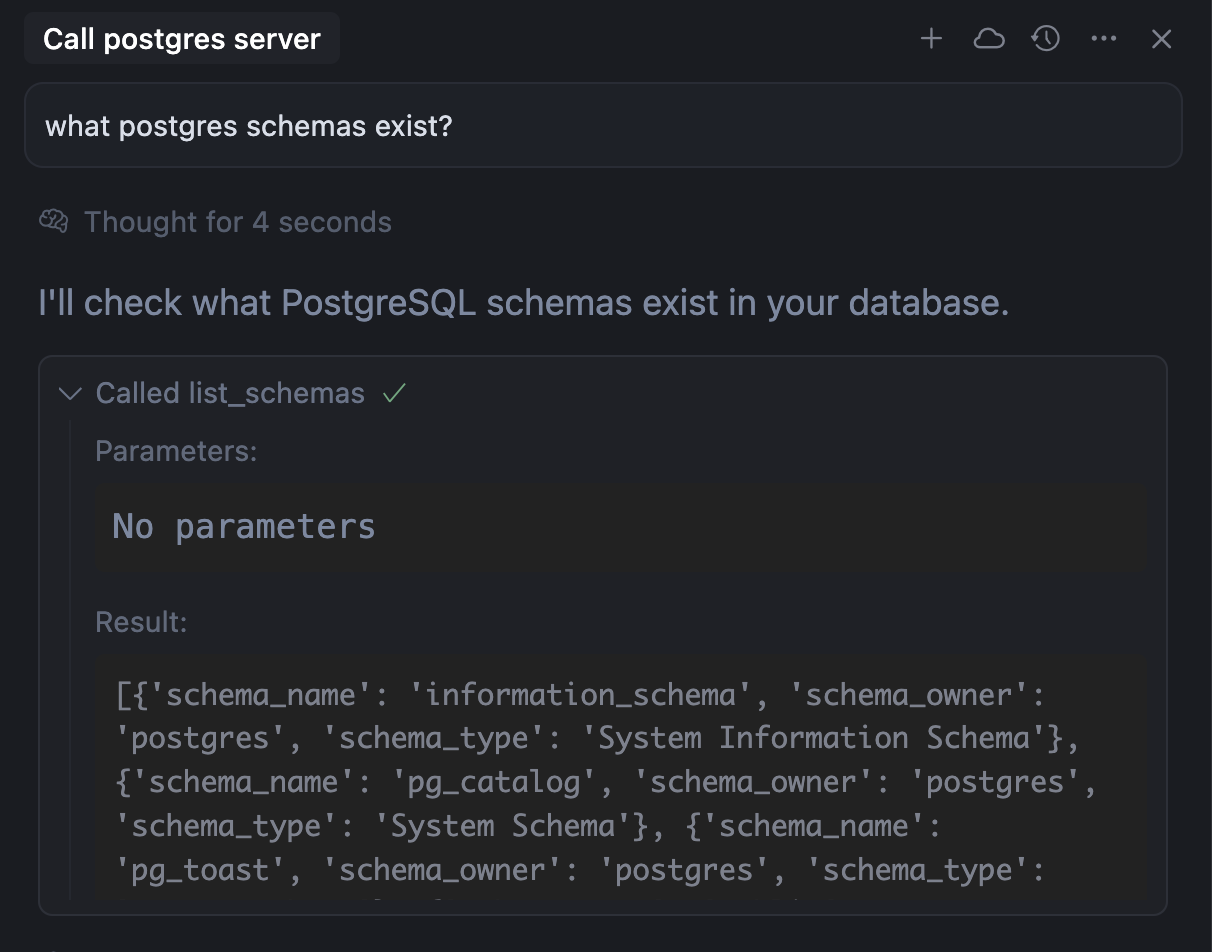
Cursor connects to external MCP servers using local stdio, SSE or Streamable HTTP. It can consume tools, prompts, resources and interactive MCP app views.
Per-project and personal connections
Configure project tools in .cursor/mcp.json or shared user tools in ~/.cursor/mcp.json. Remote servers can use OAuth; local commands use configured environment credentials.
Protocols
REST endpoints and streaming run events.
Authentication
Basic or Bearer API-key authentication, including service-account keys.
API operations
Create and manage agents and runs; stream events, cancel work and download artifacts.
Request limits
API image input has a 15 MB limit; web attachments follow separate limits.
Retries
Use increasing delays for HTTP 429 and spread requests over time.
API versions
v1 is a public beta; v0 remains documented as a legacy interface.
Ownership and deployment
Keep your project files
Work stays in normal project source files and Git changes. Review, commit and move those files through your existing repository workflow.
Product open source status
Cursor is a licensed service and client; project source generated with it remains separate.
Export scope
Project source, Git changes and pull requests.
Privacy and organization controls
Control tool execution
MCP tools request approval by default. Enterprise administrators can restrict servers, tools and network destinations; distribution and permission approval are separate controls.
Privacy Mode
Privacy Mode is available in settings to free and paid users. Team members inherit the team setting, and model-provider protections apply when it is enabled.
Account deletion
Delete your account from the Settings dashboard. Support is available at hi@cursor.com for deletion assistance.
Model training
Inputs and suggestions are not used for training, with exceptions for security review, explicit feedback or training agreement.
Processing providers
Subprocessor information is published in the trust portal.
Security documents
Certification and attestation documents can be requested through the trust portal.
Export, migration and alternatives
Project and extension portability
Existing project files remain usable outside Cursor. Extension availability still needs checking: some Microsoft-only extensions use audited Anysphere alternatives.
Export exit options
Source files and Git history stay portable across development tools.
Sources and further reading
Information checked: 2026-10-02
Cursor official product
View source · Anysphere
Cursor pricing
View source · Anysphere
Pricing and plans
View source · Anysphere
Models & Pricing
View source · Anysphere
Cursor Download
View source · Anysphere
Cursor Security
View source · Anysphere
Cursor Privacy Policy
View source · Anysphere
Cursor Terms of Service
View source · Anysphere
Rollouts and Security Review
View source · Anysphere
Model Context Protocol (MCP)
View source · Anysphere, Inc.
Cloud Agents API
View source · Anysphere, Inc.
Cursor APIs Overview
View source · Anysphere, Inc.
Extensions
View source · Anysphere, Inc.
Take part in the discussion
Sign in to comment, save tools and rate them. You can edit or withdraw your own records. Saved tools are private. Comments are published after moderation and return to review after editing. Rating totals include only valid, approved ratings.
User experiences